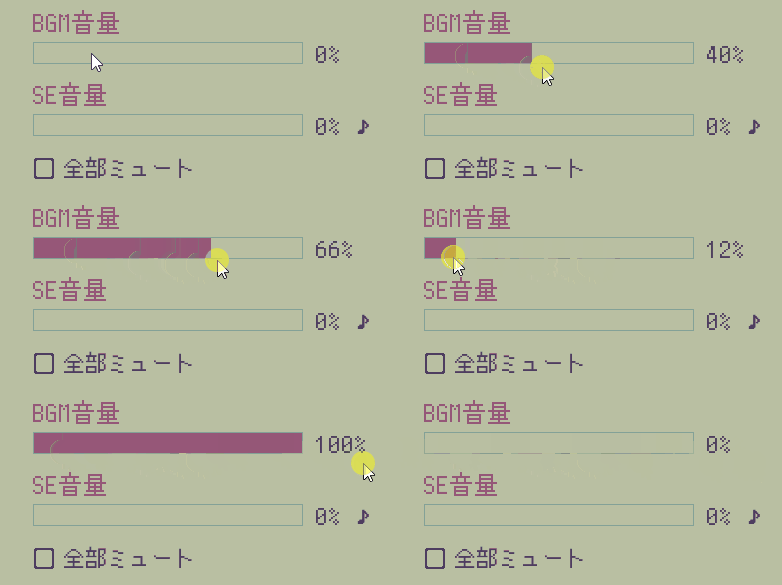
2024/02/03時点の書き方
記述例
screens.rpy
screen preferences():
(省略)

    python:
        main_vol = preferences.get_mixer("main")
        music_vol = preferences.get_mixer("music")
        sound_vol = preferences.get_mixer("sfx")

    vbox:
        hbox:
            style_prefix "slider"
            label _("マスターボリューム")
            bar value Preference("main volume"):
                alt _("マスターボリューム、エンターで選択、選択後右キーで音量を上げる、左キーで音量を下げる")
            label "{:.0f}%".format(main_vol * 100) xpos -690 text_color gcolor4

        null height 40

        hbox:
            style_prefix "slider"
            label _("BGM音量")
            bar value Preference("music volume"):
                alt _("BGMボリューム、エンターで選択、選択後右キーで音量を上げる、左キーで音量を下げる")
            label "{:.0f}%".format(music_vol * 100) xpos -690 text_color gcolor4

        null height 40

        hbox:
            style_prefix "slider"
            label _("SE音量")
            bar value Preference("sound volume"):
                alt _("効果音ボリューム、エンターで選択、選択後右キーで音量を上げる、左キーで音量を下げる")
            label "{:.0f}%".format(sound_vol * 100) xpos -690 text_color gcolor4
_preferences.get_volume→preferences.get_mixerに変更。
旧案
記述例
screens.rpy
screen preferences():
(省略)

if config.has_music:

 label _("BGM音量")
   hbox:
       bar value Preference("music volume")
       $ musi = _preferences.get_volume('music')
       # 現在のBGM音量を取得する変数を追加
       text _(" [musi:.0%]")
        # フォーマット化タグで囲って100%表示に置き換える

if config.has_sound:

label _("SE音量")
   hbox:
        bar value Preference("sound volume")
       $ musi2 = _preferences.get_volume('sfx')
       # 現在のSE音量を取得する変数を追加
       text _(" [musi2:.0%]")
       # フォーマット化タグで囲って100%表示に置き換える

       textbutton _("♪") :
        action Play("sound", config.sample_sound)
        alt _("効果音テスト")
フォーマット化コードについて
テキスト — Ren'Py Documentation
完成図